Last updated: October 2026 · Written by the VizWriting IPTV team · a beginner’s guide for the USA, UK and Canada.
The short answer
IPTV (Internet Protocol Television) is television delivered over your internet connection instead of a cable line, an aerial or a satellite dish. A provider takes live channels and on-demand films, turns them into data streams and sends them to a player app on your Smart TV, Firestick, phone or computer. You need a stable connection of around 25 Mbps, a device you probably already own, and a subscription — nothing to install on the roof and no box to rent.
How IPTV works, step by step
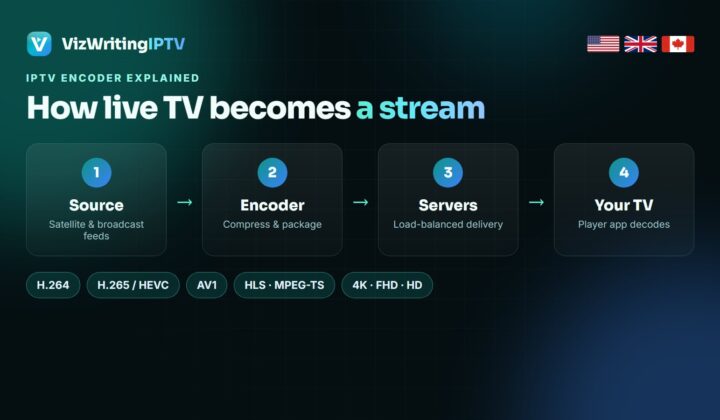
Every IPTV service, from the big telecom packages to a subscription like VizWriting IPTV, follows the same four steps:
- Capture. The channel signal is picked up at the source — satellite feeds, broadcaster contribution links or digital sources.
- Encode. An IPTV encoder compresses the picture with a codec such as H.264 or H.265 and cuts it into small data packets. This is the step that decides most of the picture quality you see later.
- Distribute. Streaming servers and load balancers send those packets to thousands of viewers at once. Good providers keep spare capacity for peak moments such as an NFL Sunday or a Saturday 3pm kick-off.
- Play. A player app — IPTV Smarters Pro, TiviMate, IBO Player or a MAG portal — logs in to the service, downloads the channel list and the TV guide, and decodes the stream on your screen.
Because the picture arrives as data, IPTV can do things broadcast TV cannot: start a programme you missed, open a film library of hundreds of thousands of titles, or carry channels from sixty countries on one login.
The three things an IPTV service delivers
- Live TV — the same channels as cable or satellite, in real time: news, entertainment, local networks and every sports channel.
- Video on demand (VOD) — films and complete series you start whenever you like, with pause, rewind and resume.
- Catch-up and time-shift — programmes that already aired, kept for a few days on supported channels, so the TV guide works backwards as well as forwards.
IPTV vs cable, satellite and streaming apps
| IPTV subscription | Cable / satellite | Streaming apps | |
|---|---|---|---|
| How it arrives | Your internet connection | Coax cable or dish | Your internet connection |
| Live channels | Thousands, many countries | 100–300, one country | A handful, or none |
| Live sport | All networks on one login | Extra sports tier | Split across several apps |
| Hardware | The TV or stick you own | Rented box, installer | The TV or stick you own |
| Contract | None, pay per term | 12–24 months | Monthly, auto-renewing |
| Typical cost | $6–$15 a month | $60–$120 a month | $10–$25 per app |
The honest trade-off: a broadcast signal does not care how busy your Wi-Fi is. IPTV does. That is why the connection advice below matters more than any channel count.
What you need to watch IPTV
1. A connection fast enough for the quality you want
| Quality | Minimum download speed | Comfortable |
|---|---|---|
| SD | 5 Mbps | 10 Mbps |
| HD (720p) | 10 Mbps | 15 Mbps |
| Full HD (1080p) | 15 Mbps | 25 Mbps |
| 4K | 25 Mbps | 35 Mbps+ |
Those numbers are per screen. Two people watching 4K in different rooms need roughly double. An Ethernet cable or 5GHz Wi-Fi beats 2.4GHz Wi-Fi every time.
2. A device
Almost anything with a screen works: Amazon Fire TV Stick, Samsung and LG Smart TVs, Android TV and Google TV boxes, NVIDIA Shield, Apple TV, iPhone, iPad, Android phones, Windows and Mac computers, and MAG boxes. If you are buying something new for IPTV, a Fire TV Stick 4K or an Android TV box is the easiest start — see our Firestick install guide.
3. A player app
The provider sends the content; the app is what you look at. IPTV Smarters Pro is the simplest, TiviMate has the best TV guide on Android TV, IBO Player covers Samsung, LG and Roku. Our best IPTV app guide compares them.
4. A subscription
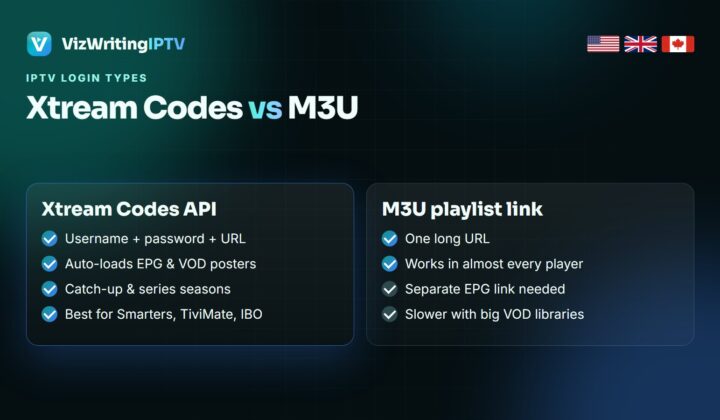
The subscription is a login — usually an Xtream Codes username, password and server address, or an M3U playlist link. You type it in once and the app fills itself with channels, the TV guide and the film library.
Is IPTV legal?
IPTV is a delivery technology, and the technology itself is legal everywhere — telecom TV packages and the big live-TV streaming apps all run on it. What varies is whether a particular service holds the rights to everything it carries, and the rules on that differ between the USA, the UK and Canada. Check the rules where you live and choose a provider that is open about its prices, refunds and support.
Pros and cons of IPTV
| Pros | Cons |
|---|---|
| A fraction of the cost of cable | Depends on your internet connection |
| Every sports network on one login | Quality varies a lot between providers |
| Works on devices you already own | Needs a player app and a one-time setup |
| No contract, no engineer, no box rental | Cheap services often disappear |
How to start with VizWriting IPTV
VizWriting IPTV carries 80,000+ live channels and 250,000+ movies and series, with complete line-ups for the USA, the UK and Canada. Ask for the free 24-hour trial, install a player, log in, and test it during something you actually want to watch. If it works for you, plans start at $15 — all of them are on the pricing page.
Further reading on how IPTV works
Three more explainers that go deeper on the parts above:
- What is IPTV and how does it work? — Tivo8k’s beginner guide, good on what you need at home before you subscribe.
- What is an M3U playlist? — KiloTV breaks down the M3U playlist format line by line.
- Qu’est-ce que l’IPTV ? — the same introduction in French from BugsTV, handy for bilingual households in Quebec.
Frequently asked questions
What does IPTV stand for?
Internet Protocol Television: TV channels and on-demand video delivered as data over an internet connection rather than through cable, satellite or an aerial.
Do I need a special box for IPTV?
No. A Smart TV, Fire TV Stick, Android box, Apple TV, phone or computer is enough. You only add a free or low-cost player app and the login from your provider.
What internet speed do I need for IPTV?
About 15 Mbps for HD, 25 Mbps for Full HD and 35 Mbps or more for 4K, per screen. A wired connection or 5GHz Wi-Fi gives the most stable picture.
Can I watch IPTV outside my home?
Yes. The login works on any internet connection, so you can watch on your phone, at a holiday home or in a hotel, within the number of screens your plan allows at the same time.
What is the difference between IPTV and streaming apps?
Streaming apps mostly offer their own on-demand catalogue. IPTV adds the full live channel line-up with a TV guide, the way cable does, plus a large VOD library on the same login.
See IPTV on your own TV, free for 24 hours
Full channel list, 4K, the TV guide and VOD. No card needed, and every paid plan has a 7-day money-back guarantee.